![iPost-GRADIENT-1.png]](https://www.ipost.com/hs-fs/hubfs/iPost-GRADIENT-1.png?width=100&height=43&name=iPost-GRADIENT-1.png)
Using Categories, you are then able to access these contacts within an easy-to-use filter group with Other system table in Dynamic Lists, Dynamic Data Tables, or Journey usage.
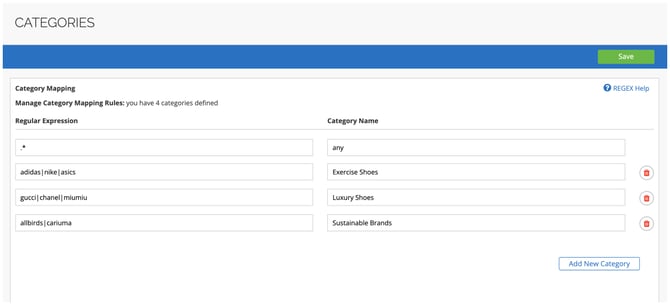
For example, say a user wants to group click behavior on specific brand URLs with a category of shoes:
| Expression | Category Name |
|---|---|
| adidas|nike|asics | Exercise Shoes |
| gucci|chanel|miumiu | Luxury Shoes |
| allbirds|cariuma | Sustainable Brands |
In the above example, any click on "https://acme.com/footwear/nike/1234" in an email would be added to the “Exercise Shoes” Category and easily used in filtering to segment those contacts.
Notice the | (pipe) between the types of shoes. When used in a regular expression, the character becomes an OR operator. Looking at our example above, if a URL containing “adidas” OR “nike” OR “asics” is clicked, and the "Exercise Shoes" Category is used within a filter, that contact would then be added to that audience.
Creating a Category
To create a Category:
- Click on the Add New Category button.
- Enter your expression into the Regular Expression field.
- Enter the category name in the Category Name field.
- Click Save.
Once the Category is created, it will take 24 hours before it can then be used as filter criteria in a Dynamic List or Dynamic Data table.
Contacts can only interact with a Category after it has been created. This means that the source table does not retroactively fill in data. Only subscribers who click on a URL linked to a Category after it has been configured will be counted when the filter is applied.
Regular Expressions
Regular Expressions (regex) allow you to match a word or a pattern in a URL. They provide a concise and flexible means to match strings of text, such as specific characters, words, or pattern of characters.
The simplest regular expression is one that has no special characters in it. For example:
- The regular expression hello matches "hello" and nothing else.
Nontrivial regular expressions use certain special constructs so that they can match more than one string. For example,
- The regular expression hello|world contains the "|" alternation operator and matches either "hello" or "world".
Regular expressions are case-sensitive.
For reference on how regular expressions can be used in matching operations, please refer to:
https://dev.mysql.com/doc/refman/8.0/en/regexp.html
Below are some of the most popular regular expressions and syntax.
Metacharacters
| Symbol/Syntax | Description |
|---|---|
| \ | Escape the next metacharacter |
| ^ | Match only the beginning of the string |
| . | Match any character |
| $ | Match the end of the string |
| | | This is the regular expression equivalent of “OR” |
| ( ) | Grouping: place parentheses around multiple items to group them together |
| [ ] | Matches any character listed between the square brackets |
Metacharacter Examples
| Example | Description |
|---|---|
| ^xyz | Matches xyz123 but not 123xyz |
| xyz$ | Matches 123xyz but not xyz123 |
| ^xyz$ | Matches only xyz. There must be no other characters before or after it |
| bcd|xyz | Matches xyz! in "From abc to xyz!" |
| [a-z] | Matches "a" or "b" or "c" ... or "z" |
Quantifiers (where “x” is a string of text)
| Example | Description |
|---|---|
| x* | Match x 0 or more times |
| x+ | Match x 1 or more times |
| x? | Match x 1 or 0 times |
| x{n} | Match exactly n instances of x |
| x{n,} | Match at least n instances of x |
| x{n,m} | Match at least n instances of x but less than or equal to m instances |
Quantifier Examples
| Example | Description |
|---|---|
| x* | Matches regardless of occurrences 0 to N times |
| x+ | Matches xy and yyyx |
| colou?r | Matches colour or color |
| x{2} | Matches xxy but not xy |
| x{1,} | Matches both xxy and xy |
| x{1,3} | Matches xxy but not xxxxxy |
Email Marketing Examples
1. Strings That Contain "special"
Example: special
✅ This is a match: http://www.example.com/?audience=Special&utm_campaign=Campaign1
❌ This is not a match: http://www.example.com/?audience=Speci-al&utm_campaign=Campaign1
2. Strings Containing Either "Special" or "Discount"
Example: (Special|Discount)
✅ This is a match: http://www.example.com/?audience=Special&utm_campaign=Campaign1
❌ This is not a match: http://www.example.com/?audience=Speci-al&utm_campaign=Campaign1
✅ This is a match: http://www.example.com/?audience=Discount&utm_campaign=Campaign1
✅ This is a match: http://www.example.com/Discount/?audience=Special
3. URLs Containing the Exact String "en" as a Parameter Value
Example: .*=en.*
✅ This is a match: http://www.example.com/?audience=enh&utm_medium=&utm_campaign=
❌ This is not a match: http://www.en.com/?en=audience&utm_medium=&utm_campaign=
4. Strings Containing Email Address
Example: [a-z0-9.%][a-z0-9.%+]*@[a-z0-9.]+[.]{1}([a-z0-9.]+\.)?[a-z]+
✅ This is a match: http://www.example.com/?email=test@example.com
❌ This is not a match: http://www.example.com/?email=test@example
5. URLs With Values For at Least One of These Parameters: utm_source, utm_campaign
Example: .*((utm_source=([^&\s]+))|(utm_campaign=([^&\s]))).*
✅ This is a match: http://www.example.com/?utm_source=Special&utm_campaign=Campaign1
❌ This is not a match: http://www.example.com/?utm_source=&utm_campaign=