
How the biggest journals run their alerts, and nine best practices any publisher or society can use to get more of them opened, read and clicked.
Journal alerts are the oldest personalized email in scholarly publishing. A researcher picks a journal, a topic or a search, and the publisher emails them when something new appears. They are opt-in by design, they arrive when the reader expects them, and they drive readers straight to articles. Yet at many publishers the alert program has not been touched since the platform was set up. This guide explains what journal alerts are, how Nature, Elsevier and Science run theirs, and what separates a table of contents email that gets opened from one that gets filtered.
What are journal alerts?
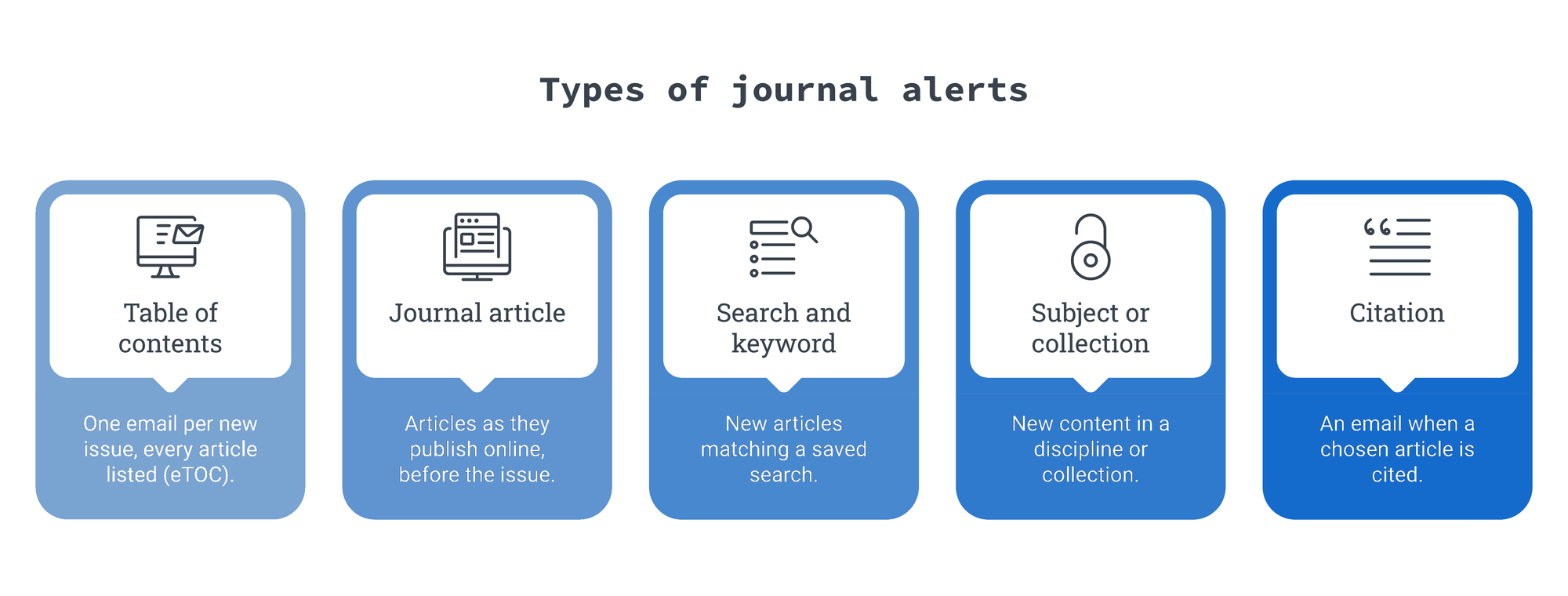
Journal alerts are automated emails a publisher sends to researchers who ask to be told when new content is published. The most common types are table of contents alerts (sent when a new issue goes live), journal article alerts (sent when individual articles publish online, often ahead of the issue), and search or topic alerts (sent when new articles match a saved search). Readers subscribe on the journal's website, usually by registering an account and choosing which journals or topics they want.
For a publisher, alerts are the one email program a reader has asked for title by title. That makes them the clearest signal of interest you own, and the strongest base for the kind of meaningful personalization researchers now expect.
The five types of journal alerts
Most publishers offer some mix of these five. The more a reader can choose, the more relevant each send becomes.
-
Table of contents alerts (eTOC). One email per issue, listing every article with titles, authors and links. The classic format and still the largest list at most journals.
-
Journal article alerts (online first or ahead of print). An email when articles publish online, before they are assigned to an issue. Faster, and often more valuable to readers in fast-moving fields.
-
Search and keyword alerts. New articles that match a saved search, across one journal or a whole platform.
-
Subject or collection alerts. New content in a discipline, special collection or article type, such as reviews or clinical trials.
-
Citation alerts. An email when a chosen article is cited. Popular with authors, who are also your most loyal readers.
How Nature, Elsevier and Science run their journal alerts
The three names researchers search for most often show three different models.
Nature journal email alerts
On nature.com and Springer Nature Link, readers click "Sign up for alerts" on a journal's homepage or its Volumes and Issues page, and subscribe journal by journal. BMC and SpringerOpen journals offer article alerts and news through a sign-up form on each journal homepage. Springer Nature's support page explains that readers then receive e-alerts whenever the journal sends them.
Elsevier journal alerts on ScienceDirect
Elsevier runs alerts through a ScienceDirect account. On a journal's home page, readers choose "Set up journal alerts" under Articles & Issues, pick the alert type and save. Elsevier's help center notes two details worth copying: new-issue alerts fire only once the whole issue is published, and every reader can manage, edit, delete or export all of their alerts from one "Manage alerts" screen. Search alerts, with a frequency the reader chooses, are available to institutional users.
Science journal alerts
Science (AAAS) treats its alerts as a flagship audience. According to the Science 2026 email advertising sheet, the Science Table of Contents alert reaches more than 230,000 registrants with an average open rate of 49%. Science Advances' table of contents reaches more than 143,000 at 42%, and Science First Release, the ahead-of-print alert, reaches more than 119,000 at 36.8%.
Those numbers set a useful bar for any publisher. If your table of contents alerts open far below that range, the list, the sending setup or the email itself needs work.
| Publisher | How readers subscribe | Alert types | What to learn from it |
|---|---|---|---|
| Nature / Springer Nature | "Sign up for alerts" on each journal homepage | Journal e-alerts; article alerts and news (BMC, SpringerOpen) | One clear button, on every journal page |
| Elsevier (ScienceDirect) | Account, then "Set up journal alerts" | New issue, search alerts (institutional) | One screen to manage every alert |
| Science (AAAS) | Registration on science.org | Table of contents, First Release, news | Treats alerts as a product, with 37–49% opens |
9 best practices for journal alerts and table of contents emails
These apply whether you publish two journals or two hundred, and whatever platform hosts your content.
-
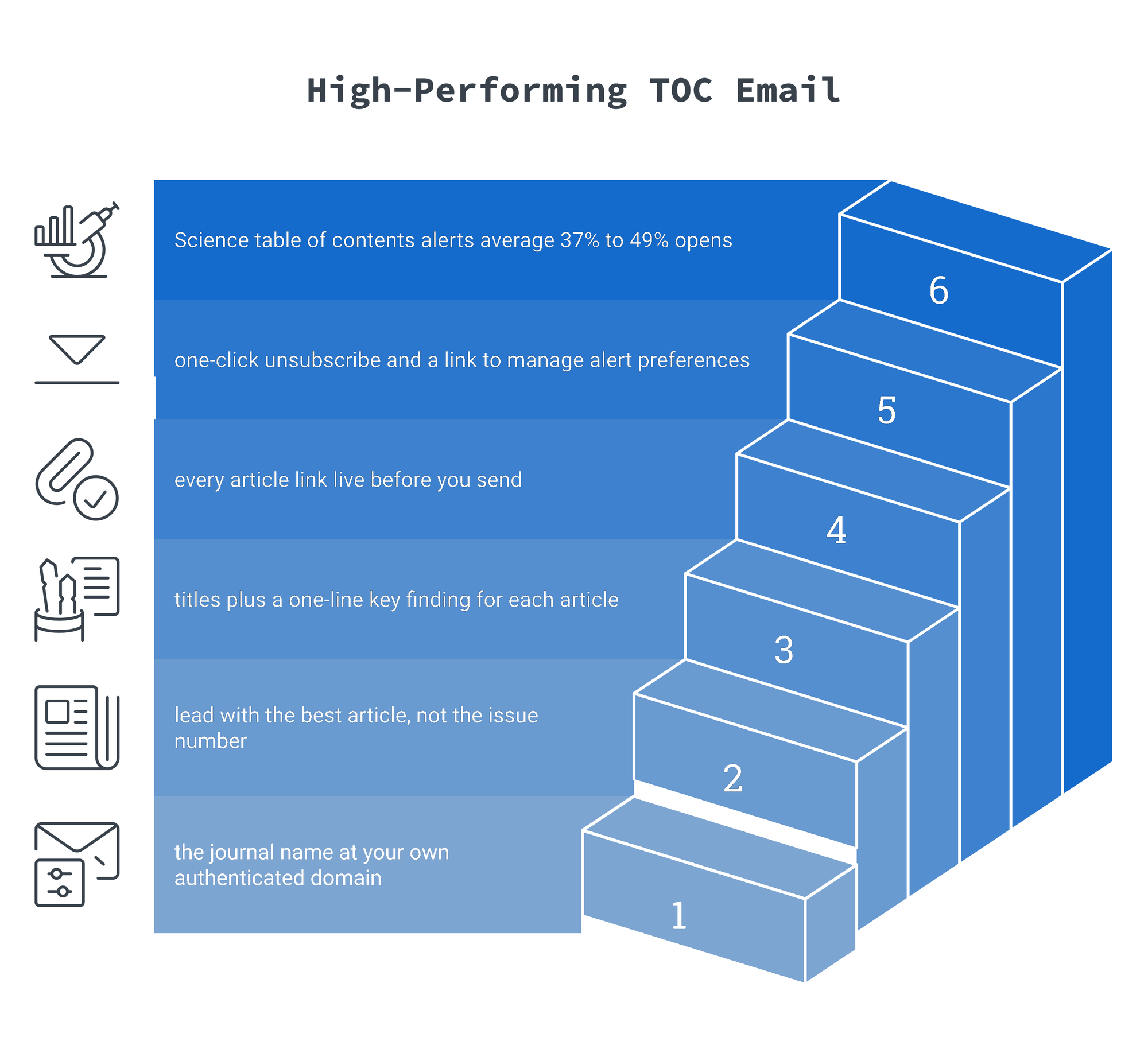
Make sign-up one click from every article. Put "Get alerts for this journal" on the journal homepage, the issue page and every article page. Readers decide to subscribe while they are reading, not while browsing your About page.
-
Let readers choose type and frequency. Offer issue alerts, online-first alerts and topic alerts, and let readers pick weekly digests for busy titles. More choice means fewer unsubscribes.
-
Send when the content is live. Follow Elsevier's lead: never send a table of contents email before every article link works. A broken link in an alert is the fastest way to lose trust.
-
Write the subject line around the best article, not the issue number. "Volume 42, Issue 7" tells a reader nothing. Lead with the most-read or most newsworthy title and keep the journal name in the sender field.
-
Show abstracts or key findings, not just titles. A one-line summary under each title lifts clicks, especially on mobile where long article titles wrap badly.
-
Use a single, recognizable sender. Send from the journal's name at your own authenticated domain, and keep it the same every time. Researchers filter by sender.
-
Meet the Gmail and Yahoo bulk-sender rules. Since 2024, senders of large volumes to Gmail and Yahoo must authenticate with SPF, DKIM and DMARC, offer one-click unsubscribe and keep spam complaints low. Alert lists are large, so they fall squarely under these rules. Check your sender reputation before you blame the content.
-
Clean the list on a schedule. Alert lists collect abandoned institutional addresses and researchers who moved on years ago. Suppress readers who have not opened in 12 months, after one re-permission email. A regular list cleanup protects delivery for everyone else.
-
Use alert behavior to personalize everything else. What a reader clicks in alerts tells you their real interests. Feed it into your other programs, from calls for papers to society membership, which is the heart of customer data integration for publishers.
Measure the right things
Open rates for alerts are inflated by Apple Mail Privacy Protection, so treat them as a trend line rather than a score (we explain why in Understanding Email Open Rates). The metrics that matter are click-to-open rate per issue, clicks per subscriber over a quarter, unsubscribe and complaint rates per send, and how many alert subscribers go on to submit, review, register or join. That last one is where alerts stop being a utility and become a growth channel.
If your alerts still go out from a platform default template with no testing, no segmentation and no link to the rest of your reader data, iPost can help. See how we work with STM and scholarly publishers, or talk to us about your alert program.
Continue the conversation
Our video series with Samast AI looks at how publishers turn content into community, including what readers really want from the emails they sign up for.
Watch the full series on YouTube: From Content to Community, STM Publishing playlist.
FAQ: Journal Alerts and Table of Contents Emails
What is a journal alert?
A journal alert is an automated email a publisher sends when new content appears in a journal, topic or saved search the reader subscribed to. Common types are table of contents alerts, article alerts and search alerts.
What is a table of contents alert?
A table of contents alert (eTOC) is an email sent when a new journal issue is published, listing every article in that issue with links to read it.
How do I set up Nature journal email alerts?
Go to the journal's homepage on nature.com and click "Sign up for alerts," or use the link on its Volumes and Issues page. You subscribe to each journal separately.
How do I set up Elsevier journal alerts?
Sign in to ScienceDirect, open the journal's home page, choose "Set up journal alerts" under Articles & Issues, pick the alert type and save. Manage all alerts from "Manage alerts" under your username.
How do Science journal alerts work?
Register on science.org and choose the alerts you want, such as the Science Table of Contents or Science First Release. The Science table of contents alert reaches more than 230,000 registrants.
What is a good open rate for a table of contents email?
Science reports average open rates of 37% to 49% across its journal table of contents alerts, which is a strong benchmark for a well-maintained alert list.
Sources
-
AAAS / Science (2025). Science 2026 Email Advertising Opportunities.
-
Elsevier. How do I set up and manage my alerts? (ScienceDirect).
-
Springer Nature. Subscribe to journal email alerts.